Error: Pop-up windows are being blocked
We have detected that your browser is blocking pop-up windows from our site. The E2open SmartHub® application makes use of pop-up windows and will not work correctly unless your browser is reconfigured.
Correcting the Problem
You will need to reconfigure your browser to allow pop-ups from https://keysight001.entomo.com:/. Below are instructions for reconfiguring some popular pop-up blockers.
Internet Explorer for Windows
At the bottom of the page select the popup that says "Options for this site". Then select "Always allow"

Chrome
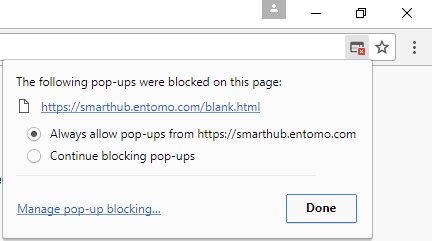
Click on the window icon with a red x through it on the far right side of the search bar.
From the drop down select "Always allow pop-ups from ....."
Firefox for Windows
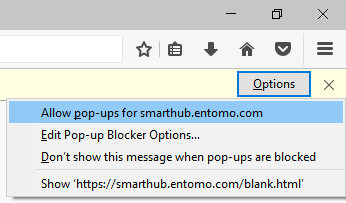
Click the button at the bottom of the page that says "Options for this site" and choose "Always allow".
Firefox for Mac
Click on the "Preferences" button on the information bar. Then select "Allow pop-ups for ..."
Safari
- In the top left of the Screen, click "Safari"
- From the drop down select "Preferences"
- Select the "Security tab"
- Under "Web content" uncheck "Block pop-up windows"